Phone Overheating Problem Causes, Fixes & Prevention Guide
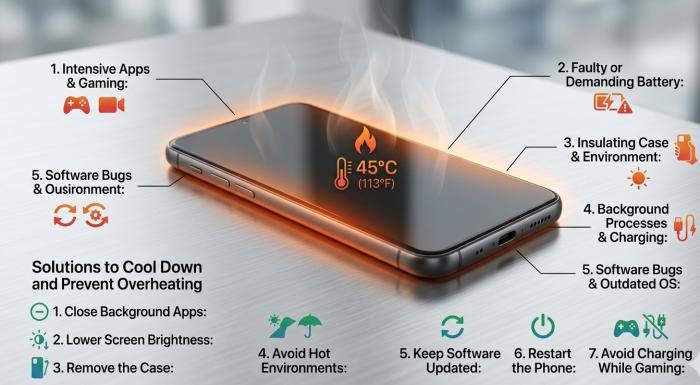
The phone overheating problem is something almost every smartphone user experiences at some point. Whether you’re gaming, charging, or just scrolling through social media, your device can suddenly feel too hot to handle.
This isn’t just uncomfortable—it can affect your phone’s performance, reduce battery lifespan, and in extreme cases, even pose safety risks. Modern smartphones are powerful, but that power generates heat, especially when not managed properly.
What Is Phone Overheating
The phone overheating problem occurs when your device’s internal temperature rises beyond its safe operating limit. Smartphones are designed to handle heat, but only within a certain range. When that limit is exceeded, the system automatically takes action to prevent damage.
Most modern smartphones work safely between 0°C and 35°C (32°F to 95°F). If the temperature goes beyond this range, your phone may reduce performance, disable certain features, or even shut down temporarily to protect its internal components.
Normal vs Abnormal Temperature
Normal Temperature: Your phone may feel slightly warm during activities like charging, watching videos, or browsing. This is completely normal and expected.
Abnormal Temperature: If your device feels excessively hot, becomes difficult to hold, or starts lagging, it’s a clear sign of a phone overheating problem that needs attention.
Signs Your Phone Is Overheating
Here are some common warning signs to watch for:
- The screen dims automatically to reduce heat
- Performance slows down due to thermal throttling
- Battery drains faster than usual
- Warning messages like “Phone temperature too high” appear
Read More: How to get more views on Instagram reels Fast Growth Tips
Common Causes of Phone Overheating
Understanding the root causes of the phone overheating problem can help you fix it faster and prevent it in the future. In most cases, overheating is triggered by a combination of usage habits, environmental conditions, and hardware limitations.
Heavy App Usage
One of the most common reasons behind the phone overheating problem is running resource-intensive apps. Activities like gaming, video editing, or switching between multiple apps force your phone’s CPU and GPU to work harder than usual. Since smartphones have limited space for cooling systems, this extra workload quickly turns into heat, especially during long usage sessions.
High Environmental Temperature
External temperature plays a big role in how your phone handles heat. Using your device under direct sunlight or in hot environments can raise its temperature rapidly. Phones naturally absorb heat from their surroundings, making it harder for them to cool down. This is why the phone overheating problem is more common during summer or in warmer climates.
Signs Your Phone Is Overheating
Recognizing the early warning signs of a phone overheating problem can help you take action before serious damage occurs. One of the most obvious signs is when your phone feels unusually hot, even during light use or while idle. You may also notice sluggish performance, lagging apps, or delayed responses as the system reduces speed to control heat.
Another common symptom is rapid battery drain, since high temperatures put extra stress on the battery. Apps may start crashing or freezing unexpectedly, and your device might display warning messages like “Phone is too hot.” These are built-in safety mechanisms designed to protect internal components and prevent long-term damage.
Quick Fixes to Cool Down Your Phone
If you’re facing a phone overheating problem, taking immediate action can help bring the temperature down quickly and prevent further damage. Start by closing all unnecessary background apps, as they continue to use processing power and generate heat. If your device is charging, unplug it temporarily since charging already produces heat.
Turning on Airplane Mode is another effective step, as it disables network activity and reduces system load. You should also move your phone to a cooler place, away from direct sunlight or hot environments. Finally, restart your phone to clear temporary processes and allow the system to reset, which often helps reduce overheating.
Long-Term Solutions to Prevent Overheating
Preventing the phone overheating problem requires a few smart habits that keep your device running efficiently over time. One of the most effective steps is keeping your software updated, as updates often include bug fixes and performance improvements that reduce unnecessary heat.
It’s also a good idea to remove unused apps, since many continue running in the background and consume system resources. Always use original or certified chargers to ensure stable power flow and avoid excess heat during charging. Lowering your screen brightness can also help.
Does Overheating Damage Your Phone
Yes, a persistent phone overheating problem can lead to serious damage over time. Excess heat is especially harmful to the battery, as it accelerates chemical degradation and reduces overall lifespan. You may notice your phone losing charge faster or not holding power as efficiently.Overheating also affects performance, forcing the system to slow down.
Thermal throttling to protect internal components.In the long run, high temperatures can put stress on critical parts like the processor and motherboard, causing them to wear out faster. In extreme situations, an overheating battery may swell, leak, or completely fail, posing potential safety risks.
When Should You Be Concerned
While a little warmth is normal, a persistent phone overheating problem should not be ignored. You should be concerned if your phone overheats frequently, even during light use, or if it becomes hot while sitting idle. Another serious warning sign is a swollen battery or a bulging back panel, which can indicate internal damage.
Unexpected shutdowns due to heat are also a clear sign that something isn’t right. These issues often point to deeper hardware or battery problems that cannot be fixed with simple troubleshooting. In such cases, it’s best to stop using the device temporarily and consult a professional technician.
Tips for Gamers & Heavy Users
If you’re a gamer or heavy smartphone user, you’re more likely to experience the phone overheating problem due to continuous high performance demands. Playing graphics-intensive games or running multiple apps for long periods puts significant stress on your device’s processor and battery.
To reduce heat, try lowering in-game graphics settings, which decreases the workload on your GPU.It’s also important to take short breaks between long sessions to allow your phone to cool down naturally. Avoid playing games while charging, as this combines two major heat sources at once.
Conclusion
The phone overheating problem is a common issue, but in most cases, it can be easily managed with the right habits and awareness. By understanding the main causes—such as heavy usage, improper charging practices, and high environmental temperatures—you can take early steps to prevent it from becoming serious.
Applying quick fixes when needed and following long-term prevention tips will not only keep your phone cool but also improve its overall performance and lifespan. Follow these simple practices to keep your phone running smoothly, avoid unnecessary damage, and ensure a safer, more reliable user experience every day.
FAQs
Q1. Why does my phone overheat while charging
Ans: Charging naturally produces heat, but the phone overheating problem can become more noticeable when using fast chargers or low-quality accessories. Higher power flow increases battery temperature, especially if you’re using the phone at the same time.
Q2. Is it normal for phones to get hot while gaming
Ans : Yes, it’s completely normal. Gaming uses both the CPU and GPU intensively, which generates heat. However, if the temperature becomes too high or affects performance, it may indicate a phone overheating problem, especially during long gaming sessions.
Q3. Can overheating cause battery explosion
Ans: Although rare, extreme overheating combined with battery damage can lead to dangerous situations. Modern smartphones are designed with built-in safety mechanisms to minimize this risk and protect users.
Q4. How can I quickly cool down my phone
Ans. You can close background apps, turn on Airplane Mode, and move your phone to a cooler place. Avoid putting it in a fridge, as sudden temperature changes can cause internal damage.
Q5. Does fast charging increase overheating
Ans: Yes, fast charging can generate more heat compared to standard charging. While it’s generally safe, frequent use may contribute to the phone overheating problem if combined with heavy usage.
Q6. Can a phone case cause overheating
Ans: Some thick or poorly ventilated cases can trap heat, making it harder for your phone to cool down, especially during gaming or charging.
Q7. When should I replace my phone battery
Ans: If your phone heats up frequently, drains quickly, or shows signs like swelling, it may be time to replace the battery to avoid further issues.