Best Laptop Stand for Work, Study & Home Setup
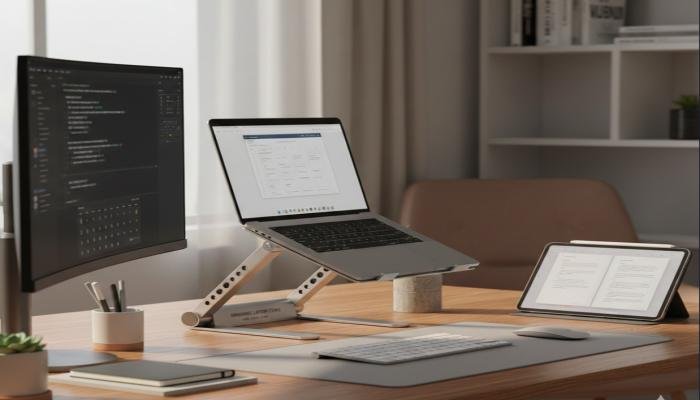
Using a laptop for long hours has become a daily routine for many people. Whether you’re working remotely, attending online classes, or managing tasks from home, your laptop often stays open for hours at a time. While laptops are designed for portability, they are not always ideal for comfort or posture when used on a desk.
Many users experience neck pain, shoulder stiffness, wrist discomfort, and even back problems after prolonged laptop use. This usually happens because the laptop screen sits too low, forcing you to bend your neck and hunch your shoulders. Over time, this poor posture can affect productivity and long-term health.
That’s where the best laptop stand plays a crucial role. A good stand lifts your laptop to eye level, improves airflow, and helps you maintain a healthier sitting position. It turns a basic desk into a more ergonomic workspace without requiring expensive furniture.
Why a Laptop Stand Is More Important Than You Think
Many people assume laptop stands are optional accessories, but in reality, they solve multiple everyday problems. When your laptop is placed flat on a desk, the screen angle is fixed and often too low. This causes you to tilt your head downward, putting extra pressure on your neck and spine.
A laptop stand raises the screen closer to eye level, helping you sit upright. This simple adjustment can reduce muscle strain, improve breathing, and even help you stay focused for longer periods. Over time, better posture leads to fewer aches and better energy levels during work or study sessions.
Another overlooked benefit is cooling. Laptops generate heat, and placing them flat on a desk or bed can block airflow. A well-designed laptop stand allows better ventilation, which helps maintain performance and prevents overheating, especially during heavy tasks like video editing or long Zoom meetings.
Who Should Use the Best Laptop Stand
The best laptop stand is useful for a wide range of users, not just office professionals. Students attending online classes often spend hours staring at screens, and a proper stand helps prevent early posture issues. Freelancers and remote workers benefit from improved comfort during long workdays.
Home users who casually browse, stream videos, or manage household tasks also gain from a laptop stand. Even gamers and content creators can experience better airflow and stability with the right stand. In short, if you use a laptop regularly, a stand can make a noticeable difference in comfort and performance.
Read More: Phone overheating problem fixes
Types of Laptop Stands Available
Laptop stands come in different styles, each serving a specific purpose. Fixed stands are simple and sturdy, offering a single height that suits most desks. Adjustable stands allow you to change height and angle, making them more flexible for shared or multi-use workspaces.
Foldable and portable stands are ideal for travelers or students who move between locations. These are lightweight and easy to store in a backpack. There are also laptop stands with built-in cooling fans, designed for heavy users who need extra thermal support. Choosing the best laptop stand depends on how and where you use your laptop most often.
Key Features to Look for in the Best Laptop Stand
Before buying a laptop stand, it’s important to understand the features that actually matter. Height adjustment is one of the most important factors. The stand should raise your laptop screen to eye level without forcing you to strain your neck.
Stability is another major consideration. A good laptop stand should feel solid and secure, even when typing. Non-slip pads and sturdy materials like aluminum or reinforced plastic help prevent wobbling. Ventilation design also matters, especially if your laptop heats up quickly.
In this section, the table below highlights essential features to consider when choosing the best laptop stand for daily use.
| Feature | Why It Matters | Best For |
| Adjustable Height | Improves posture and viewing angle | Work & Study |
| Strong Material | Ensures stability and durability | Long-term Use |
| Ventilated Design | Prevents overheating | Heavy Tasks |
| Foldable Build | Easy to carry and store | Travel & Students |
| Non-slip Pads | Keeps laptop secure | Typing Comfort |
Best Laptop Stand for Work Environment
In a professional work setup, comfort and efficiency are key. The best laptop stand for work should offer height adjustment and solid build quality. Aluminum stands are popular in offices because they look professional and last longer.
Pairing a laptop stand with an external keyboard and mouse creates a near-desktop experience. This setup reduces wrist strain and allows you to type more comfortably. If you work long hours, investing in a high-quality stand can significantly improve your daily routine.
Noise-free stability is also important in work environments. A stand that doesn’t shake while typing or during video calls helps maintain focus and professionalism.
Best Laptop Stand for Study and Online Classes
Students often work in shared or limited spaces, so flexibility matters. The best laptop stand for study should be lightweight, adjustable, and easy to move. Foldable stands are especially useful for students who switch between desks, beds, or libraries.
Online classes require long screen time, making posture support essential. A proper stand helps students sit upright and stay attentive. Over time, this can reduce fatigue and improve concentration during lectures and study sessions.
Affordability is also a factor for students. Many budget-friendly laptop stands offer excellent support without compromising basic ergonomics.
Best Laptop Stand for Home Setup
Home setups vary widely, from dedicated offices to kitchen tables. The best laptop stand for home use should adapt to different environments. Adjustable stands work well here, allowing you to change height depending on your chair or desk.
Home users often multitask, using laptops for work, entertainment, and personal tasks. A versatile stand supports all these activities comfortably. It also helps keep your workspace organized by freeing up desk space underneath the laptop.
Aesthetic design can also matter at home. Many modern laptop stands blend well with home décor, making your workspace look cleaner and more intentional.
How a Laptop Stand Improves Productivity
Comfort directly affects productivity. When you’re not constantly adjusting your posture or dealing with discomfort, you can focus better on tasks. The best laptop stand helps maintain a natural sitting position, reducing distractions caused by physical strain.
Better airflow also keeps your laptop running smoothly, preventing slowdowns during important tasks. With improved screen positioning, your eyes experience less strain, making it easier to work or study for longer periods without fatigue.
Small improvements in comfort can lead to big gains in efficiency over time.
Common Mistakes When Buying a Laptop Stand
One common mistake is choosing a stand based only on appearance. While design matters, functionality should come first. A stand that looks good but lacks stability or adjustability may cause more harm than good.
Another mistake is ignoring laptop size compatibility. Not all stands support larger or heavier laptops. Always check weight limits and size recommendations. Lastly, many users overlook ventilation, which can affect laptop performance in the long run.
How to Use a Laptop Stand Correctly
Using a laptop stand properly is just as important as choosing the right one. The top of your screen should be at or slightly below eye level. Your shoulders should remain relaxed, and your back should stay straight while sitting.
It’s recommended to use an external keyboard and mouse when your laptop is elevated. This keeps your wrists in a natural position and prevents strain. Take short breaks to stretch and adjust your posture throughout the day. Proper usage maximizes the benefits of the best laptop stand.
FAQs – Best Laptop Stand
Q1: Is a laptop stand really necessary for daily use?
Ans: Yes, a laptop stand helps improve posture, reduce neck strain, and enhance comfort during long hours of laptop use.
Q2: Can the best laptop stand help with back pain?
Ans: It can help reduce back pain by encouraging better posture and proper screen height alignment.
Q3: Are adjustable laptop stands better than fixed ones?
Ans: Adjustable stands offer more flexibility and are better for shared or multi-purpose setups.
Q4: Do laptop stands work with external keyboards?
Ans: Yes, using an external keyboard with a laptop stand is recommended for better ergonomics.
Q5: Will a laptop stand prevent overheating?
Ans: A ventilated laptop stand improves airflow, which helps reduce heat buildup.
Q6: Is a portable laptop stand good for students?
Ans: Yes, portable and foldable stands are ideal for students who move between locations.
Q7: What material is best for a laptop stand?
Ans: Aluminum is durable and stable, while high-quality plastic offers lightweight portability.