Webcam Test Online to Check Camera Quality Instantly
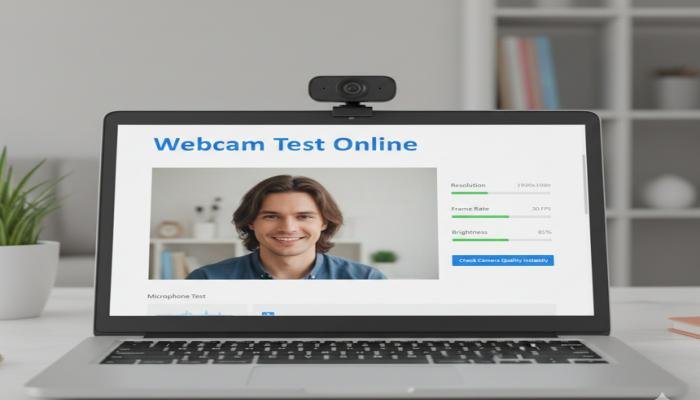
In today’s digital-first world, webcams are no longer optional. From online classes and remote jobs to video calls with friends and live streaming, your webcam plays a major role in how others see you. A blurry, dark, or lagging camera can instantly ruin communication and leave a poor impression. That’s why running a webcam test online to check camera quality instantly has become a smart and necessary step before any important video interaction.
Many people assume their camera is working fine until the moment a call starts and problems appear. Poor lighting, incorrect browser permissions, outdated drivers, or low camera resolution often go unnoticed. An online webcams test helps you identify these issues in seconds without installing software or creating an account.
The biggest advantage of using an online webcam test is speed and simplicity. You open the page, allow camera access, and instantly see how your camera performs in real-time. This allows you to adjust lighting, angle, focus, and settings before joining meetings or recordings.
Another reason webcam testing matters is compatibility. Different browsers and devices handle cameras differently. A webcam that works well on one browser may perform poorly on another. Testing helps ensure your camera works smoothly across platforms like Chrome, Firefox, Edge, or Safari.
Webcam test online to check camera quality instantly gives you confidence. Whether you are attending a job interview, hosting a webinar, or recording content, knowing your camera is working properly removes stress and improves your on-screen presence.
What Is a Webcam Test Online and How It Works
A webcams test online is a browser-based tool that checks your camera’s functionality and performance in real time. It does not require downloads, sign-ups, or technical knowledge. The test simply accesses your webcam (with permission) and displays the live feed so you can evaluate quality.
When you start the test, the browser asks for camera access. Once approved, the tool activates your webcam and shows video output instantly. Some tools also analyze resolution, frame rate, brightness, contrast, and color balance.
The process is entirely local, meaning the video stream stays on your device and is not uploaded to any server. This makes webcam testing fast, private, and secure for everyday users.
Most online webcams tests work on laptops, desktops, tablets, and even smartphones. They support built-in cameras as well as external USB webcams. This flexibility makes them useful for almost anyone.
Read More: Best bluetooth speaker home outdoor 2026
Why Checking Camera Quality Before Use Is Important
Camera quality directly affects communication. If your image is unclear, pixelated, or poorly lit, viewers may struggle to focus on what you’re saying. This becomes especially important during professional meetings or educational sessions.
Low camera quality can also impact credibility. In job interviews or client calls, a clean and sharp video feed helps create a professional impression. On the other hand, grainy or lagging video may appear careless, even if the issue is technical.
Testing your webcam allows you to fix problems early. You might realize your room needs better lighting, your camera angle is off, or another app is already using the camera in the background.
For content creators, camera testing is essential. Video quality affects audience engagement, watch time, and overall content value. Running a quick webcams test ensures you deliver the best possible visuals.
Common Issues Found During Webcams Testing
Many users are surprised by what a webcam test reveals. One of the most common issues is low resolution, where the video looks blurry even though the camera is technically working. Lighting problems are another frequent issue. Poor lighting can make a high-quality camera look bad. Shadows, overexposure, or yellow tones often appear during testing.
Frame rate drops are also common, especially on older devices. A low frame rate results in choppy or laggy video, which can be distracting during calls. Incorrect camera selection is another issue. Some devices have multiple cameras, and the system may select the wrong one by default. A webcam test helps you confirm the correct camera is active.
What a Webcam Test Checks in Real Time
A webcams test does more than just show your video. It allows you to visually inspect multiple quality factors that affect performance. The test shows how sharp your image is, how well colors appear, and whether the camera adjusts properly to movement and light changes. You can also see if the video freezes or stutters.
Some webcam tests indicate resolution and frame rate, helping you understand your camera’s technical limits. This is useful for streaming or recording purposes. The test also confirms whether your browser and operating system are communicating properly with the camera. If permission issues exist, they become obvious immediately.
Webcam Test Quality Factors
| Feature Checked | What It Shows | Why It Matters |
| Camera Detection | Confirms webcam is recognized | Prevents device errors |
| Video Clarity | Sharpness and focus level | Improves visual quality |
| Lighting Balance | Brightness and exposure | Avoids dark or washed video |
| Frame Rate | Smoothness of movement | Reduces lag |
| Color Accuracy | Natural skin tones | Enhances appearance |
How to Run a Webcam Test Online Step by Step
Running a webcam test online is simple and takes less than a minute. First, open a trusted webcams test page using a modern browser. Once the page loads, click the start or test button. The browser will ask for permission to access your camera. Allow access to continue.
After permission is granted, your live camera feed appears on the screen. Observe how you look and move slightly to check smoothness. Adjust lighting, camera angle, or distance if needed. If issues appear, close other apps that may be using the camera and refresh the page.
Best Situations to Use a Webcam Test
Webcam testing is useful in many everyday scenarios. Before joining an online meeting, a quick test ensures everything works properly. Students attending online classes benefit from webcams testing, especially before exams or presentations. It helps avoid interruptions and delays.
Remote workers often test their webcams before interviews, team meetings, or client calls to maintain a professional image. Content creators and streamers rely on webcams tests before recording videos or going live to ensure consistent quality. Webcam test online to check camera quality instantly provides peace of mind and better results.
Webcam Test for Different Devices and Browsers
Different devices handle webcams differently. Laptops usually have built-in cameras, while desktops rely on external webcams. Mobile devices also support webcams testing through browsers, though features may vary. Testing helps confirm compatibility.
Browsers play a role too. Chrome, Firefox, Edge, and Safari may display different performance results depending on settings and updates. Running a webcam test on your preferred browser ensures optimal performance during real use.
Privacy and Safety During Webcam Testing
Privacy is a common concern when accessing a webcam online. Reliable webcam test tools operate locally and do not record or store video. The browser controls camera access, and you can revoke permission anytime. Closing the page immediately stops camera use.
Always check the browser’s address bar to confirm camera access status. Avoid unknown or suspicious sites. Using a trusted webcam test online to check camera quality instantly keeps your testing safe and private.
Tips to Improve Webcam Quality After Testing
If your webcam test shows poor quality, small changes can make a big difference. Improving lighting is often the fastest fix. Positioning the camera at eye level improves framing and appearance. Avoid placing the camera too low or too close.
Cleaning the camera lens can significantly improve clarity, especially on laptops. Closing background apps frees system resources and improves frame rate during video use.
Webcam Test vs Installed Camera Software
Some webcams come with dedicated software, but online tests are faster and more convenient for quick checks. Installed software may offer advanced controls, while online tests focus on instant feedback. For most users, a webcam test online to check camera quality instantly is enough for daily needs.
Final Thoughts
A webcam test online to check camera quality instantly is one of the easiest ways to avoid video issues and improve your on-screen presence. It takes seconds, requires no technical skills, and helps you look your best in any online interaction.
By testing your webcam regularly, adjusting settings, and understanding performance limits, you can ensure smooth and clear video every time. Whether for work, study, or personal use, webcam testing is a simple habit that delivers real benefits.
FAQs about webcam test online
Q1: What is a webcam test online?
Ans: A webcam test online is a browser-based tool that checks if your camera works properly and shows live video quality instantly.
Q2: Is webcam testing safe to use?
Ans: Yes, trusted webcam tests run locally in your browser and do not store or record video.
Q3: Do I need to install software for a webcam test?
Ans: No, online webcam tests work directly in your browser without downloads.
Q4: Can I test an external USB webcam online?
Ans: Yes, most online webcam tests support both built-in and external webcams.
Q5: Why does my webcam look blurry during testing?
Ans: Blurriness is often caused by low resolution, dirty lenses, or poor lighting conditions.
Q6: Does a webcam test work on mobile devices?
Ans: Yes, many webcam test tools work on smartphones and tablets through modern browsers.
Q7: How often should I run a webcam test?
Ans: It’s best to test your webcam before important calls, meetings, or recordings.