FF Name Space: Stylish Free Fire Names & Copy-Paste Spaces
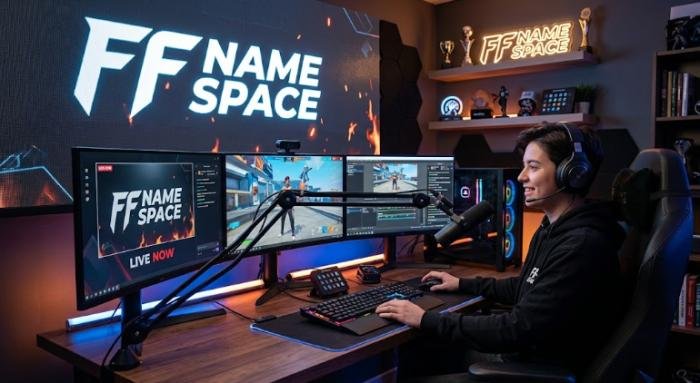
Creating a stylish Free Fire nickname sounds simple until you try adding a clean space between words or symbols. A regular keyboard space may not always produce the look you want, while many websites offer so-called invisible or blank characters without clearly explaining what they actually are.
This can leave players with rejected names, missing spaces, or nicknames that look different across devices. The solution is to understand how an FF name space works and use copy-paste characters carefully rather than relying on unverified tricks.
FF name space options, stylish nickname ideas, copy-paste methods, information about Unicode characters such as U+3164 HANGUL FILLER, troubleshooting tips, and important Free Fire nickname considerations. The goal is to help you create a clean, unique, and readable Free Fire name with confidence.
Read More: Free Fire Name Space: Copy and Use Blank Space in Your Name
What Is FF Name Space?
FF name space is a commonly used term for a space or special character used to create spacing within a Free Fire nickname. It is not the official name of a Free Fire feature. Instead, it describes a technique players use when creating or formatting their in-game names.
For example: a player might want to separate two words:
Shadow Warrior
rather than:
ShadowWarrior
A player might also want to separate a nickname from a decorative symbol:
Shadow • FF
or:
亗 Shadow
The purpose is usually visual. Spacing can make a nickname easier to read and can give it a cleaner appearance. There are two basic categories to understand:
- Regular space: The ordinary blank character entered from a keyboard.
- Unicode character: A character represented by a specific Unicode code point that may have a different visual appearance or behavior.
Why Do Players Search for FF Name Space?
Players generally search for this topic because they want to:
- Create a stylish Free Fire nickname.
- Separate words in a username.
- Add spacing around symbols.
- Create a blank-looking name effect.
- Copy and paste a special character.
- Make an ordinary nickname appear more distinctive.
- Find alternatives when the normal space does not produce the desired result.
What Is U+3164 HANGUL FILLER?
U+3164 is one of the Unicode characters frequently associated with blank-looking nickname techniques. The Unicode Standard officially names U+3164 HANGUL FILLER. It belongs to the Hangul Compatibility Jamo block.
The character has a specific history connected to Korean character encoding. Unicode documentation explains that U+3164 originated from Row 4 of KS X 1001 and was used in representing Hangul syllables that were outside the set of precomposed syllables covered by that encoding. That is very different from saying that Unicode created U+3164 specifically for Free Fire.
Is U+3164 a Normal Space?
A regular space and U+3164 are different characters. This is one of the most important facts to remember when using an ff name space. A normal space is intended for separating text. U+3164 has a completely different Unicode identity and historical purpose. Its visual appearance can make it seem like a blank area, which is why it has become popular in discussions about invisible or blank-looking usernames.
Why Can U+3164 Look Blank?
Characters are not always displayed in the same way by every application. Some Unicode characters have little or no visible glyph under particular rendering conditions. U+3164 is one of the characters that can appear blank in contexts where its glyph is not visually prominent.
Unicode-related documentation also lists U+3164 among characters that can be treated as default-ignorable in certain processing contexts. But “looks blank” does not mean “works everywhere.” The final appearance depends on the software, font, text-processing system, and the rules imposed by the application receiving the character.
FF Name Space Copy-Paste: What You Should Know
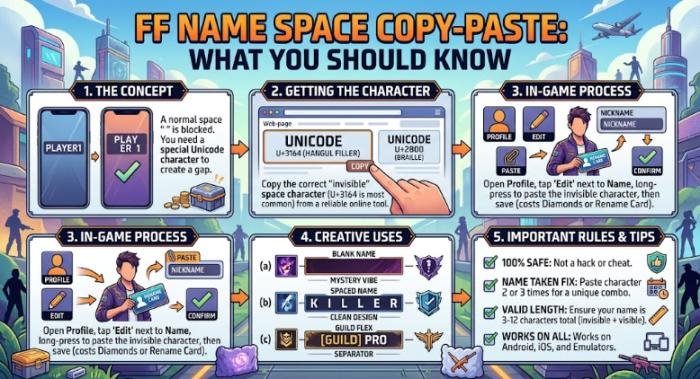
Copy-paste is popular because typing unusual Unicode characters manually is inconvenient. A player can copy a character from a website and paste it into a nickname field. However, there is no universal guarantee that the game will accept it. This is because the following three things are separate:
- Unicode recognizes the character.
- Your device can copy and paste the character.
- Free Fire accepts the character in its nickname field.
How to Test an FF Name Space
If you want to experiment with a Unicode-based space, use a simple process:
- Copy the character from a trustworthy source.
- Open Free Fire.
- Go to the profile or nickname-change section.
- Enter your preferred name.
- Paste the character where you want the spacing.
- Check whether the game accepts the nickname.
- Inspect how the finished name appears.
- Confirm the change only after checking the complete nickname.
Why Copy-Paste Spaces Sometimes Fail
A character can fail for several reasons. The game may:
- Reject unsupported characters.
- Remove certain characters.
- Process the character differently.
- Limit which characters are allowed.
- Display the character differently than expected.
An app update can also change how nickname input is handled.Therefore, websites that promise that one particular “invisible space” will always work should be treated cautiously.
How to Add Space to a Free Fire Name
The simplest approach is to start with a normal, readable nickname and then test additional formatting.
Method 1: Use a Regular Space
If the nickname field accepts a standard space, this is the easiest option. For example:
Dark Warrior
or:
Night Hunter
A normal space has an obvious advantage: people understand exactly what it is. There is no need to depend on a special Unicode character when ordinary spacing already produces the desired result.
Method 2: Try a Unicode Character
If your intended design requires a blank-looking character, you can test a Unicode character such as U+3164. The process is straightforward:
- Copy the character.
- Insert it into your nickname.
- Paste the result into Free Fire.
- Check the preview or resulting nickname.
- Confirm whether the game accepts it.
Method 3: Use a Visible Separator
If a blank-looking character is rejected, visible symbols are an excellent alternative. Examples include:
Shadow • FF
Dark | Player
Nova × FF
Ghost ★
Wolf 亗
How to Change Your Free Fire Nickname
The exact interface can change between game versions and regions, so the safest approach is to follow the nickname-change option currently displayed inside Free Fire. Generally, the process involves:
- Open the game.
- Visit your player profile.
- Select the option for editing or changing your nickname.
- Enter the new name.
- Check the spelling and characters.
- Confirm the change using the method currently offered in the game.
Before confirming, check the entire nickname carefully.
Best Stylish FF Name Space Ideas
A stylish name does not have to contain dozens of symbols. In many cases, simple formatting creates a better result.
Clean Name Ideas
Examples of simple nickname structures include:
- Shadow FF
- Dark Warrior
- Night Wolf
- Silent Hunter
- Nova Player
- Royal King
- Ghost FF
Short Name Formats
Short names can be easier to recognize during matches. Examples:
- Vex FF
- Nova X
- Dark Pro
- Wolf FF
- Ace X
- Ghost Pro
Symbol-Based Formats
You can also combine spacing with visible symbols:
- Shadow • FF
- Nova | Pro
- Dark × FF
- Ghost ★
- Wolf 亗
- Ace • X
Why Your FF Name Space Is Not Working
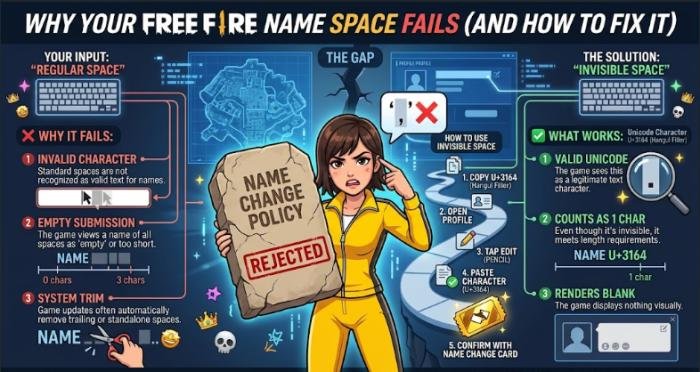
If your copied character does not work, there are several possible explanations.
Invalid Character Error
If Free Fire rejects the character, remove it and try a simpler format. You can test:
- A regular space.
- A visible symbol.
- A shorter nickname.
- Fewer special characters.
The Space Disappears
A blank-looking Unicode character may be removed or processed differently. If this happens, do not keep adding the same character repeatedly. Try a standard space or a visible separator instead.
The Name Looks Different on Another Device
Unicode rendering can vary between software environments. A character that looks blank or stylish in one location may have a different appearance elsewhere. This is one reason readable names are usually more dependable than highly complicated Unicode combinations.
The Whole Nickname Is Rejected
The problem may not be the space. Check the complete nickname for:
- Unsupported symbols.
- Unusual Unicode characters.
- Offensive language.
- Excessive decoration.
- Impersonation-related wording.
FF Name Space vs. Stylish Symbols
| Feature | Normal Space | Unicode Character | Visible Symbol |
| Appearance | Blank | May appear blank or unusual | Clearly visible |
| Entry method | Usually easy | Often copy-paste | Type or copy-paste |
| Compatibility | Generally simpler | Depends on game support | Depends on game support |
| Best use | Word separation | Special formatting | Decorative names |
| Readability | High | Can vary | Usually high |
How to Choose a Good Free Fire Name
Keep It Readable
Your nickname may appear in:
- Match results.
- Player lists.
- Profiles.
- Friend lists.
- Screenshots.
- Videos and streams.
A name that is difficult to read can lose some of its value even if it looks unusual.
Use Spacing Purposefully
Good spacing helps organize the nickname. For example:
Dark Warrior is easy to understand. A nickname packed with numerous blank-looking characters can be much harder to interpret.
Test Before Confirming
A browser-based nickname generator cannot guarantee how Free Fire will render your name. The game itself is the most relevant place to test the final format.
Avoid Excessive Symbols
One or two symbols can provide a clean decorative effect. Too many can make the nickname difficult to recognize. A strong gaming name is usually:
- Short.
- Memorable.
- Readable.
- Distinctive.
- Appropriate.
- Compatible with the game.
Free Fire Nickname Rules and Safety
Creating a stylish nickname does not mean ignoring the game’s rules. Garena’s Abuse Policy specifically addresses inappropriate in-game names and signatures. The policy includes content involving hate speech, discrimination, violence, offensive or vulgar material, sexually explicit content, and impersonation of Garena staff or other players.
Avoid Offensive Names
Do not use a nickname to harass, threaten, insult, or target another person or group. Garena’s policy states that inappropriate in-game names and signatures can be subject to enforcement.
Avoid Impersonation
A nickname should not be designed to make other players believe that you are Garena staff or another specific player.
Use Characters Carefully
Special characters can make a nickname attractive, but compatibility and readability are more important than decoration. If a character creates problems, replace it with a simpler alternative.
Practical Tips for Using FF Name Space
For the best results:
- Start with a simple nickname.
- Add one formatting element at a time.
- Test a regular space first.
- Use Unicode characters only when necessary.
- Test copied characters inside Free Fire.
- Avoid outdated promises about invisible names.
- Keep the final name readable.
- Avoid offensive or impersonating names.
- Use visible symbols if blank-looking characters fail.
- Keep an alternative nickname ready.
Conclusion
Finding the right FF name space can be frustrating when normal spaces do not create the desired look or copied Unicode characters are rejected. Using random invisible characters may also lead to names that disappear, display incorrectly, or stop working after changes to the game. The better solution is to choose a simple, readable spacing method and test the final nickname directly in Free Fire before confirming it.
Whether you prefer a regular space, a Unicode character, or a visible separator such as •, |, ×, or ★, the goal should be a name that looks stylish without sacrificing readability or compatibility.With these tips, you can create a unique, clean, and attractive Free Fire nickname with confidence.
FAQs about FF Name Space
Q1: What is an FF name space?
Ans: An FF name space generally means a normal space or special Unicode character used to create spacing within a Free Fire nickname. It is a community term, not the official name of a Garena feature.
Q2: How can I add a space to my Free Fire name?
Ans: Try a normal keyboard space first if the nickname field accepts it. If you want a blank-looking effect, you can test a Unicode character through copy-paste. The important point is to verify that Free Fire accepts the character before confirming the nickname.
Q3: What is U+3164?
Ans: U+3164 is officially named HANGUL FILLER by Unicode. It belongs to the Hangul Compatibility Jamo block and has a historical connection to Korean character encoding.
Q4: Is U+3164 the same as a normal space?
Ans: No. U+3164 and the ordinary space are different Unicode characters. U+3164 can appear blank in some contexts, but it is not the standard keyboard space.
Q5: Why does my FF name space disappear?
Ans: The game may reject, remove, or process the character differently. Rendering can also vary between applications and devices. If it disappears, try a regular space or visible separator.
Q6: Can I still make an invisible Free Fire name?
Ans: You should not assume that a particular invisible-name method is permanently supported. Free Fire controls which characters its nickname system accepts, and those rules can change.
Q7: Why does my stylish name look different on another device?
Ans: Different software, fonts, and rendering environments can display Unicode characters differently. A character that looks blank or decorative in one environment may not look identical elsewhere.
Q8: Can special characters cause Free Fire nickname problems?
Ans: Yes. Some characters may be rejected or rendered unexpectedly. If a special character causes an error, replace it with a simpler character or visible separator.