Shipment Outscanned to Network: Meaning, Delivery Time, Tracking and Next Steps
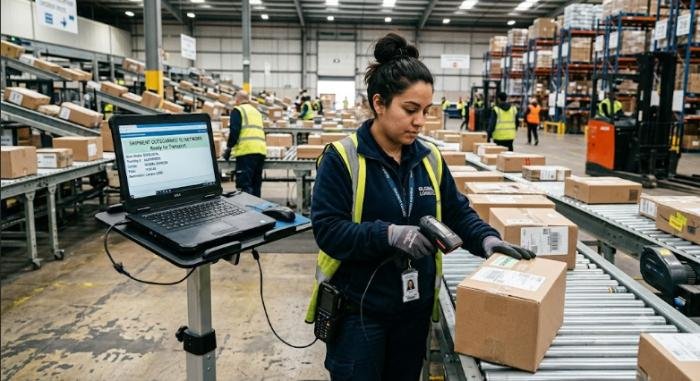
Online package tracking has made it easier than ever to follow a shipment from the seller to your doorstep. However, many tracking updates contain logistics terms that can be confusing. One such status is Shipment Outscanned to Network. If you’ve noticed this message in your tracking history, you’re probably wondering whether your package is moving normally, how long it will take to arrive, or whether you should be concerned.
The good news is that, in most cases, Shipment Outscanned to Network is a routine tracking update. It usually means the carrier has processed your package at a facility and sent it onward through its transportation network toward the next destination. How the shipping process works after this update, how long it typically lasts, why delays sometimes happen, what actions you should take, and answers to the most common questions customers ask.
Read More: Artaverse.org Trending Stories Latest News, Highlights & Updates
What Does Shipment Outscanned to Network Mean?
The tracking status Shipment Outscanned to Network generally indicates that your package has been scanned while leaving a sorting or distribution facility and has entered the carrier’s transportation network for the next stage of its journey. Although wording varies among shipping companies, the meaning is generally similar:
- The package has been processed.
- It has departed a logistics facility.
- It is traveling to another sorting center or delivery location.
- The shipment remains under the carrier’s control.
This update is considered a positive sign because it confirms that the package is progressing through the shipping network.
What Does “Outscanned” Mean?
In shipping operations, a scan records a package’s location whenever it reaches or leaves a facility. An outscan means the parcel has been scanned as it exits a warehouse, sorting center, or distribution hub before transportation to the next destination.
What Does “Network” Mean?
The network refers to the carrier’s transportation system, which includes:
- Distribution centers
- Sorting facilities
- Trucks
- Cargo aircraft
- Rail transport
- Local delivery stations
Once your shipment enters this network, it moves between facilities until it reaches the delivery office responsible for your address.
Why Carriers Use This Status
Shipping companies process millions of packages every day. Tracking scans help:
- Confirm package movement
- Improve shipment visibility
- Support customer tracking
- Reduce misplaced shipments
- Improve operational efficiency
Many major carriers use similar internal logistics scans even if customer-facing wording differs.
What Happens After Shipment Outscanned to Network?
After this tracking update, your package usually follows several transportation stages before delivery.
Transfer to Another Facility
Most shipments travel through multiple sorting centers. Depending on the shipping route, the package may move to:
- Regional distribution centers
- National sorting hubs
- Airport cargo facilities
- Local delivery stations
Transportation Between Locations
The shipment is transported using the carrier’s available logistics methods. These may include:
- Delivery trucks
- Long-haul trailers
- Cargo aircraft
- Rail freight
- Ferry or marine transport (where applicable)
The chosen method depends on:
- Shipping service
- Distance
- Delivery commitment
- Geographic location
Arrival at the Destination Region
After transportation, another scan usually appears when the shipment reaches the next facility. Common tracking updates may include:
- Arrived at Facility
- Processing at Distribution Center
- In Transit
- Arrived at Local Facility
Preparation for Delivery
When the shipment reaches the local delivery office, it is sorted according to delivery routes. A later update may show:
- Out for Delivery
At this point, the package is typically loaded onto the delivery vehicle.
How Long Does Shipment Outscanned to Network Take?
There is no universal delivery time because every shipment follows a different route. Typical timeframes include:
Domestic Shipments
Most domestic deliveries continue moving within:
- 1–5 business days for express services
- 3–7 business days for standard shipping
International Shipments
International packages often require:
- Customs processing
- International transportation
- Import inspections
- Local carrier transfers
These shipments may take several additional days or even weeks depending on destination country and shipping service.
Factors That Affect Delivery Time
Several factors influence how long the status remains unchanged. These include:
- Distance between facilities
- Shipping method
- Weather conditions
- Traffic disruptions
- Customs clearance
- Weekends
- Public holidays
- High seasonal shipping volume
Large shopping events such as Black Friday or year-end holidays often increase processing times.
Why Does Shipment Outscanned to Network Stay the Same for Several Days?
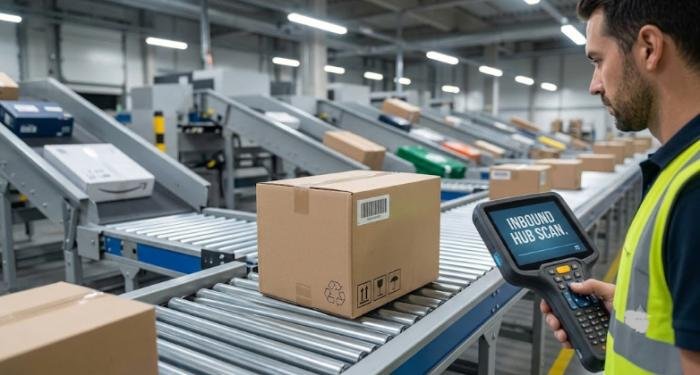
Customers sometimes worry when tracking stops updating. In many situations, this is completely normal.
The Package Is Traveling
Long-distance transportation often occurs without intermediate scans. For example, a shipment traveling hundreds of miles by truck may not receive another tracking update until it reaches the next facility.
Scanning Delays
Occasionally, a package continues moving even though tracking has not yet been updated. The shipment may receive multiple scans later, making it appear as though several updates occurred at once.
Weather Conditions
Snowstorms, hurricanes, floods, heavy rain, or extreme temperatures can temporarily slow transportation. Safety usually takes priority over delivery speed.
Peak Shipping Periods
Holiday shopping seasons significantly increase package volume. Sorting facilities may require additional processing time before updating tracking information.
Transportation Issues
Unexpected operational issues may also cause delays, including:
- Vehicle maintenance
- Flight cancellations
- Road closures
- Labor shortages
- Route adjustments
Customs Processing
International shipments may remain unchanged while customs authorities inspect documentation or verify import requirements. This process varies between countries.
Is Shipment Outscanned to Network a Normal Tracking Status?
For the vast majority of shipments, this is a completely normal tracking update. It simply indicates that the shipment has left one stage of processing and entered the next transportation segment.
When You Should Not Worry
Generally, there is no cause for concern if:
- The expected delivery date has not passed.
- The shipment recently received this update.
- The package continues following normal transit times.
When You Should Investigate
You may wish to contact the carrier or sender if:
- Tracking has not changed for many business days beyond normal transit expectations.
- The estimated delivery date has passed.
- The carrier specifically requests customer action.
- The tracking history reports an exception or delivery problem.
How to Track a Shipment After Shipment Outscanned to Network
Proper tracking helps you stay informed throughout the shipping process.
Use the Official Carrier Tracking Tool
Always use the shipping company’s official tracking page whenever possible. Official tracking information is typically updated first.
Enable Delivery Notifications
Many carriers offer:
- Email notifications
- SMS alerts
- Mobile app notifications
These services automatically notify customers when tracking changes.
Verify the Tracking Number
Double-check that:
- Every digit is correct.
- No characters are missing.
- The shipment belongs to your order.
Incorrect tracking numbers can produce confusing results.
Monitor Estimated Delivery Dates
Estimated delivery dates may change during transit. Always rely on the latest tracking information provided by the carrier.
What Should You Do If Shipment Outscanned to Network Does Not Change?
If tracking appears stuck, follow these practical steps.
Wait a Reasonable Amount of Time
Many shipments travel without frequent scans. Waiting one or two business days is often appropriate before assuming there is a problem.
Review Recent Tracking Activity
Check whether:
- The package recently left a facility.
- Weather alerts have affected transportation.
- Holidays may delay processing.
Contact the Carrier
If the shipment exceeds expected transit times, contact customer support with:
- Tracking number
- Shipping address
- Order information
The carrier may provide additional shipment information not shown publicly.
Contact the Sender
Retailers sometimes have direct communication channels with shipping companies and may be able to request shipment investigations.
Request a Missing Package Investigation
If the shipment appears lost after the carrier’s recommended waiting period, the sender or recipient may be eligible to request a package investigation, depending on the carrier’s policies.
Common Reasons for Shipment Delays
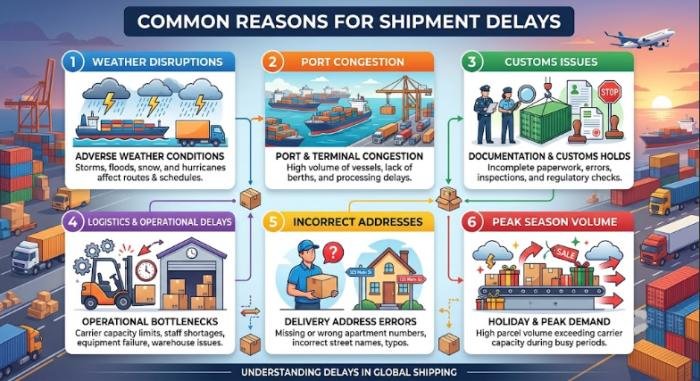
Shipping delays happen for many legitimate reasons. Some of the most common include:
- Severe weather
- Customs inspections
- Airport congestion
- Incorrect addresses
- Transportation accidents
- High parcel volumes
- Security screening
- Mechanical problems
- Natural disasters
- Regional service disruptions
Most delays are temporary and resolve once transportation resumes.
Shipment Outscanned to Network vs Similar Tracking Statuses
Although many tracking updates appear similar, they describe different stages of package movement.
| Tracking Status | Meaning | Recommended Action |
| Shipment Received | Carrier has accepted the package from the sender. | Wait for processing. |
| Shipment Outscanned to Network | Package has left a facility and is moving through the carrier’s transportation network. | Continue monitoring tracking updates. |
| Arrived at Facility | Shipment reached the next sorting or distribution center. | No action needed. |
| In Transit | Package is moving between facilities. | Continue tracking normally. |
| Out for Delivery | Package is with the delivery driver. | Expect delivery that day if no exceptions occur. |
| Delivered | Shipment has reached its destination. | Confirm receipt of the package. |
Which Carriers May Use Similar Tracking Statuses?
Every shipping company has its own terminology. Even if the exact wording differs, the meaning is often nearly identical. Examples include:
- USPS
- UPS
- FedEx
- DHL
- Canada Post
- Australia Post
- Royal Mail
- Regional courier companies
Some carriers display phrases such as:
- Departed Facility
- In Transit
- Left Sorting Center
- Processed Through Facility
Despite the wording differences, these updates usually indicate continued package movement.
Best Practices for Tracking Your Shipment
Following a few simple habits can make package tracking easier.
Save Your Tracking Number: Store the tracking number somewhere accessible until delivery is complete.
Check Official Updates: Carrier websites and mobile apps generally provide the most accurate shipment information.
Enable Notifications: Automatic alerts reduce the need to repeatedly check tracking pages.
Keep Order Records: Retain:
- Order confirmation
- Shipping receipt
- Payment confirmation
- Customer service emails
These records are useful if support is needed.
Know the Carrier’s Support Timeline: Most carriers recommend waiting until the estimated delivery window has passed before opening a missing package inquiry.
Final Thoughts
Shipment Outscanned to Network on your tracking page is generally a positive sign. It means your package has left a processing facility and is moving through the carrier’s logistics network toward its next destination.
While the time between updates varies depending on distance, shipping service, weather, customs, and package volume, this status is usually part of the normal delivery process. Tracking may not update continuously during transit, especially on long transportation routes.
FAQs
Q1. What does Shipment Outscanned to Network mean?
Ans: It means your package has been scanned as it leaves a sorting or distribution facility and is traveling through the carrier’s transportation network to the next destination.
Q2. Is Shipment Outscanned to Network a normal tracking update?
Ans: Yes. It is a standard logistics update that usually indicates your shipment is progressing normally toward delivery.
Q3. How long does Shipment Outscanned to Network last?
Ans: It depends on the shipping service, distance, weather, customs processing, and carrier operations. Many domestic shipments receive another update within one to several business days.
Q4. Why has my tracking not changed for several days?
Ans: Packages sometimes travel long distances without intermediate scans. Weather delays, transportation schedules, holidays, customs inspections, and high shipping volumes can also delay tracking updates.
Q5. Should I contact the carrier immediately?
Ans: Not usually. If the estimated delivery date has not passed, it is generally best to wait. Contact the carrier if tracking remains unchanged well beyond the expected delivery timeframe or if the shipment shows an exception.
Q6. Can my package be lost after Shipment Outscanned to Network?
Ans: Although it is possible, most shipments continue moving normally. A lack of updates does not necessarily mean a package is lost. If the delay becomes unusually long, contact the carrier or sender to request assistance.
Q7. Does Shipment Outscanned to Network mean my package is out for delivery?
Ans: No. This status indicates the shipment is moving through the carrier’s transportation network. It has not yet reached the final delivery vehicle unless a later update specifically says Out for Delivery.
Q8. Does this tracking status appear on international shipments?
Ans: Yes. Similar tracking updates may appear on international shipments as packages move between export facilities, customs offices, transportation hubs, and destination countries.