Free Fire Name Space: Copy and Use Blank Space in Your Name
If you want a cleaner, more distinctive nickname in Free Fire, you may have searched for a free fire name space that you can copy and paste between words. The idea is simple: instead of relying only on the ordinary keyboard space, some players use a Unicode character that can appear blank or nearly blank when displayed.
However, there is an important technical distinction. A blank-looking Unicode character is not necessarily the same thing as a normal space, and being a valid Unicode character does not automatically mean that Free Fire will accept it in every nickname. Game input rules can change, so a character that works in one version or situation may not work in another.
Read More: knowledgearrow.com website: Content, Features & Online Resources
What Is a Free Fire Name Space?
A free fire name space generally refers to a space or blank-looking Unicode character that players attempt to place inside a Free Fire nickname.A normal keyboard space is the Unicode character U+0020 SPACE. Unicode also contains several other spacing characters, including no-break spaces, thin spaces, en spaces, and other forms. The Unicode Standard separately identifies U+200B as ZERO WIDTH SPACE, while U+3164 is officially named HANGUL FILLER.This distinction matters because many websites casually call every blank-looking character an “invisible space.” Technically, that description can be misleading.
For example, U+3164 is not officially called an invisible space. It is a Hangul compatibility character. Unicode documentation identifies it as HANGUL FILLER, and historical Unicode documentation describes Hangul filler characters as having no visible glyph in ordinary display.
For Free Fire players, the practical goal is usually much simpler: create a nickname that appears separated or formatted in a way that the ordinary keyboard space may not provide.
Normal Space vs. Blank-Looking Unicode Characters
Understanding the difference helps prevent confusion when a nickname does not work.A standard space is a genuine spacing character. It is represented by U+0020 in Unicode. The Unicode Standard lists U+0020 among its space characters along with several other characters such as U+00A0 NO-BREAK SPACE, U+2002 EN SPACE, U+2003 EM SPACE, U+2009 THIN SPACE, and U+3000 IDEOGRAPHIC SPACE.
A zero-width space is different. Unicode defines U+200B ZERO WIDTH SPACE as a character used primarily to provide a word-break opportunity without an intrinsic visible width. It is not simply another version of the ordinary keyboard space.U+3164 is different again. Its official Unicode name is HANGUL FILLER. It belongs to the Hangul Compatibility Jamo block rather than the Unicode space-character category.
That means a player should not assume that every character described online as an “invisible space” will behave identically.
Why Can a Character Look Blank?
Text on a screen is created from characters, but not every character necessarily produces an obvious visible symbol.Some Unicode characters have special rendering or formatting behavior. U+200B, for example, has no intrinsic width and normally does not produce a visible glyph. Unicode also documents Hangul filler characters such as U+3164 as characters without visible glyphs in the relevant rendering context.
The result is that a character can exist inside a text string even though the user cannot see a conventional letter, number, or symbol.That is why a nickname can sometimes appear to contain an empty area even though a character is actually present.
How to Use a Free Fire Name Space
The basic process is straightforward, but the exact result depends on the current Free Fire nickname-validation rules.
Step 1: Choose Your Nickname
Start with the actual words you want to use.For example:
- Shadow King
- Dark Warrior
- Pro Hunter
- Night Rider
- FF Legend
Think about readability before adding decorative characters. A short and recognizable nickname is usually easier for other players to remember.
Step 2: Copy the Blank-Looking Character
If you are using a Unicode character supplied by a reputable copy tool or article, copy the character itself.This is important because copying a label such as “U+3164” does not copy the character. You need the actual Unicode character in your clipboard.
A useful tool on your website can place the verified character inside a dedicated copy box so visitors can copy it without accidentally selecting additional text.
Step 3: Open Your Free Fire Nickname Area
Open Free Fire and navigate to the part of your profile where your nickname can be changed.The exact interface can change with updates, regional versions, or game revisions. For that reason, it is better to follow the controls currently displayed inside your own game rather than rely on an old screenshot from a third-party website.
Step 4: Paste the Character
Place the copied character where you want the separation to appear.For example, a nickname could conceptually follow this structure:
DarkㅤKing
The character shown between the two words is a blank-looking Unicode character rather than a conventional keyboard space.
Whether that exact character is accepted by the current Free Fire client should be tested at the time you create the name.
Step 5: Check the Preview
Before confirming the nickname, inspect how it appears.Look for:
- Unexpected symbols
- Missing characters
- Excessive spacing
- Rejected characters
- An error message
- A nickname that is difficult to read
If the game rejects the name, simplify it rather than repeatedly adding different invisible characters.
Does a Free Fire Name Space Always Work?
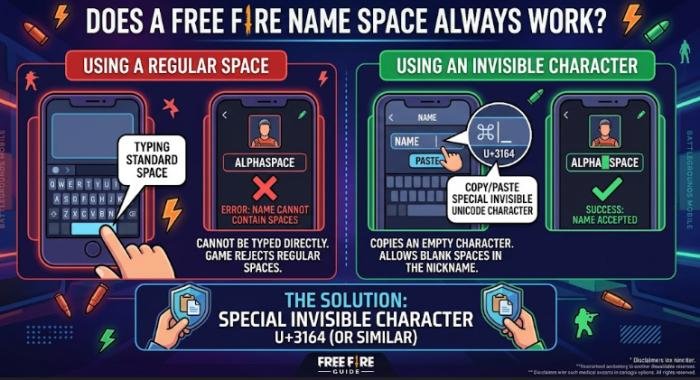
No. This is one of the most important points to understand.A Unicode character can be valid according to the Unicode Standard while still being rejected by a particular application.Unicode defines characters and their properties; it does not determine which characters a game must permit inside a nickname. Free Fire can apply its own validation rules to names.
Therefore, an online article should not promise that a particular invisible or blank-looking character will work permanently on every Free Fire version.This is especially important for copy-paste websites that claim a particular character “always works.” Such claims can become outdated after a game update.A better approach is to describe the character accurately, provide a copy option, and tell users to test it in the current game client.
Why Is My Free Fire Name Space Not Working?
There are several possible reasons.
The Character Is Not Accepted: The simplest explanation is that the current nickname system does not accept that particular character.A Unicode character being valid does not mean Free Fire must accept it.
You Copied the Wrong Content: If you copied the words surrounding a blank character, quotation marks, brackets, or a Unicode code such as “U+3164,” the game may receive something different from what you intended.When copying, select only the actual character.
The Character Is Being Normalized or Removed: Applications can process Unicode text differently. Some systems normalize, filter, remove, or replace characters before storing or displaying them.That means a character that looks blank in a browser may not behave the same way inside a game.
The Nickname Contains Too Many Special Characters: Using multiple unusual characters can make a nickname more likely to encounter validation or rendering problems.If your name is rejected, remove unnecessary symbols and test a simpler version first.
The Game Has Changed Its Validation Rules: A technique that worked in an older tutorial may stop working after a later game update.This is why current testing is more reliable than relying on an old claim that a particular character is guaranteed to work.
U+3164 Hangul Filler Explained
One of the characters frequently discussed in connection with blank-looking usernames is U+3164 HANGUL FILLER.It is important to use the correct terminology.
What Is U+3164?
U+3164 is officially named HANGUL FILLER.It is part of the Unicode Hangul Compatibility Jamo block. Unicode describes that block as containing spacing, nonconjoining Hangul consonant and vowel elements supplied for compatibility with the KS X 1001:1998 standard.
U+3164 should therefore not be described as though it were simply another name for U+0020 SPACE.
Is U+3164 a Normal Space?
No.
The ordinary space is U+0020. U+3164 is HANGUL FILLER.The two characters have different Unicode identities and purposes.The reason U+3164 can be useful in some nickname experiments is related to how it is rendered, not because it is technically the ordinary space character.
What About U+200B ZERO WIDTH SPACE?
U+200B has the official name ZERO WIDTH SPACE.
Unicode explains that it is used primarily to provide a line-break opportunity and has no intrinsic width. It normally does not create a visible space between characters.This makes it different from fixed-width space characters.For Free Fire nickname purposes, that difference matters because the game’s nickname validator may accept one character while rejecting another.
Free Fire Name Space Examples
The following examples illustrate how different types of spacing can appear. They should be treated as formatting examples rather than guarantees that every character will be accepted by the current Free Fire client.
| Type | Example | What It Means |
| Normal nickname | DarkKnight | No space between words |
| Ordinary space | Dark Knight | Uses the standard U+0020 space |
| Blank-looking Unicode character | DarkㅤKnight | Uses a Unicode character that may appear blank |
| Short formatted name | FFㅤPro | Combines a short tag with a blank-looking character |
| Symbol-style name | Darkㅤ亗 | Combines a Unicode character with a decorative symbol |
How to Create Stylish Free Fire Names With Space
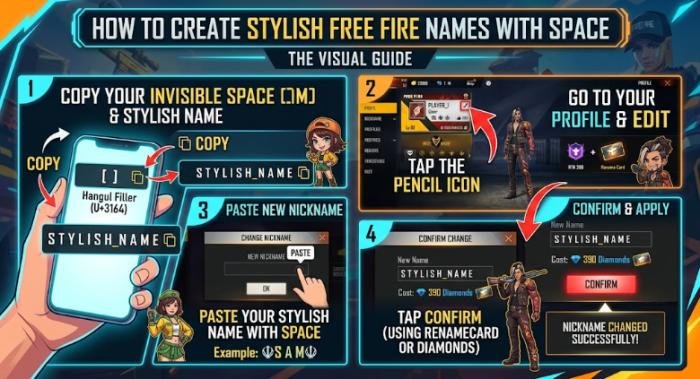
A blank-looking character is only one part of nickname design. The best names generally balance appearance and readability.
Short Stylish Names: Short names are easier to recognize during matches.Examples include:
- ShadowㅤX
- DarkㅤFF
- ProㅤKing
- NightㅤX
- GhostㅤFF
You can experiment with capitalization and a small number of symbols without making the nickname overly complicated.
Team-Style Names: If you belong to a guild or gaming group, you can place a short tag before the nickname.For example:
FFㅤShadow
or
RXㅤHunter
A consistent format can make members of the same group easier to identify.
Clean Minimal Names: Minimal nicknames can be more effective than names filled with symbols.For example:
DarkㅤKnight
is easier to read than a long nickname containing several unrelated decorative characters.The goal should be a name that looks distinctive while remaining recognizable.
Names With Symbols: Symbols can add visual personality, but they also introduce another layer of compatibility.A symbol that appears correctly on one device may render differently elsewhere. Some characters can also be rejected by a game’s nickname system.If a nickname fails, remove the decorative symbols first and test the blank-looking character on its own.
Can You Use a Free Fire Name Space on Android?
The basic copy-and-paste concept can work on Android when the character is accepted by the game.The process is generally:
- Copy the required Unicode character.
- Open Free Fire.
- Go to the nickname-changing interface.
- Paste the character into the desired position.
- Check the result.
- Confirm the change if the game accepts it.
Android keyboards and clipboard systems can vary between devices, so if pasting does not work, first test whether the character can be pasted correctly into another ordinary text field.If it appears correctly elsewhere but is rejected by Free Fire, the issue is more likely to involve the game’s nickname validation rather than your keyboard.
Can You Use a Free Fire Name Space on iPhone?
The same general principle applies on iPhone.Copy the Unicode character, open the game’s nickname field, and paste it into the desired position.
However, the operating system, keyboard, clipboard behavior, and game interface can differ from Android. Therefore, device-specific instructions should be treated as practical guidance rather than a guarantee.
The most important test is whether the current Free Fire client accepts and displays the character correctly.
Does the Device Change How Unicode Characters Work?
Unicode provides a common standard for representing text, but applications decide how they process and display those characters.A character may:
- Appear blank in one application
- Produce a visible placeholder in another
- Be ignored by another system
- Be rejected by a game’s input validator
- Be transformed during text processing
Unicode itself documents that unsupported characters and invisible or formatting characters can have specialized display behavior.So if a character works in a browser, messaging app, or notes application, that does not prove that Free Fire will accept it.
Is Using a Free Fire Name Space Safe?
Using a Unicode character through ordinary copy and paste is fundamentally different from modifying Free Fire’s files or using unauthorized software.That distinction is important.
Garena’s current Abuse Policy prohibits unauthorized programs and modifications to the game client, servers, or game data. It states that unauthorized programs can lead to account suspension and that modifying or tampering with game data is not allowed.For nickname customization, the safest approach is therefore to stay within the game’s normal interface.
Avoid Third-Party Game Modification Tools
You do not need a modified APK, game-data editor, injector, or similar software merely to paste text into a nickname field.Garena specifically warns against unauthorized programs and game-client modifications.
A website that provides a copyable Unicode character is not the same thing as software that modifies the Free Fire client. Still, users should be careful about downloading unknown applications simply to create a nickname.
Use an Appropriate Nickname
A stylish nickname should also follow the game’s rules.Garena’s Abuse Policy says inappropriate in-game names can be reset and identifies prohibited categories including hate speech, discrimination, violence, offensive or obscene content, impersonation, illegal activities, harassment, and related harmful content.A blank-looking character does not make an otherwise prohibited nickname acceptable.
Free Fire Name Space vs. Other Invisible Characters
It is useful to understand that “invisible character” is a broad informal term.
U+0020 SPACE
This is the ordinary space used by keyboards and normal text.
U+00A0 NO-BREAK SPACE
This is a Unicode spacing character that prevents a line break at that position. It is different from an ordinary space. Unicode lists it among its space characters.
U+200B ZERO WIDTH SPACE
This character has no intrinsic width and is primarily intended to provide a word-break opportunity. Unicode specifically distinguishes its behavior from fixed-width spaces.
U+3164 HANGUL FILLER
This is a Hangul compatibility character, not the normal space character. Its official Unicode name is HANGUL FILLER.The practical lesson is simple: do not assume that every character described as an invisible space is interchangeable.
Does Free Fire Allow Invisible Characters in Nicknames?
There is no good reason to treat every Unicode invisible or blank-looking character as universally accepted.Free Fire controls its own nickname validation. Unicode establishes character standards, but it does not require an individual game to accept every Unicode code point.Therefore, the most accurate answer is:
Some blank-looking Unicode characters may work in a Free Fire nickname, but compatibility depends on the game’s current input and validation rules.
If a particular character is rejected, that does not mean Unicode is broken. It means the application is applying its own rules.This is also why tutorials should be updated when the game changes.
How to Change Your Free Fire Nickname
If your goal is to use a free fire name space, the nickname-change process should be handled through Free Fire’s normal in-game functionality.Prepare your name first, including the blank-looking character if you have tested one.Then:
- Open Free Fire.
- Open your profile.
- Select the available nickname-change option.
- Enter or paste your prepared nickname.
- Review the result carefully.
- Confirm the change through the game’s normal process.
Avoid relying on old screenshots for the exact interface because game menus can change.If you encounter an account-related issue, Garena provides an official support request system that asks for information such as the account UID, nickname, device model, operating-system version, and description of the problem.
What to Do If Your Name Change Fails
Start with the simplest troubleshooting steps.First, remove unnecessary symbols and test the nickname with fewer unusual characters.Second, make sure you copied the actual Unicode character rather than its written code.Third, try placing only one blank-looking character between two ordinary words.
Fourth, confirm that the character is actually being pasted into the nickname field.Finally, if the issue appears to involve your account rather than the nickname itself, use Garena’s official customer-service system.Garena maintains regional customer-service teams, including a dedicated Bangladesh support channel, and directs players toward their relevant regional support team.
Common Mistakes When Using Free Fire Name Space
Using the Unicode Code Instead of the Character
U+3164 is a code point label. Typing those five characters does not insert the HANGUL FILLER character.
Assuming All Blank Characters Are Identical
U+0020, U+200B, and U+3164 have different Unicode identities and different technical behavior.
Using Too Many Special Characters
A nickname with excessive symbols can become difficult to read and may be more likely to encounter validation problems.
Trusting Outdated Tutorials
A method can work at one point and fail later if the game’s nickname system changes.
Installing Unknown Apps
There is no need to modify the game client just to customize a text nickname. Garena prohibits unauthorized programs and modifications that interact with or alter the game.
Ignoring Nickname Rules
A blank-looking character does not override Garena’s rules for inappropriate names. Names violating the current policy can be reset and, in serious or repeated cases, may lead to stronger account action.
Final Thoughts
A free fire name space can be useful when you want a nickname with a cleaner or more distinctive appearance, but it is important to understand what you are actually copying.The ordinary keyboard space is U+0020 SPACE. U+200B is ZERO WIDTH SPACE, while U+3164 is officially HANGUL FILLER. These are different Unicode characters with different technical purposes and behaviors.
For practical nickname customization, copy the actual character, paste it through Free Fire’s normal nickname interface, and test the result. Do not assume that a character that worked in an old tutorial will continue to work after future updates.Most importantly, avoid third-party tools that modify the game client. Garena’s current policies prohibit unauthorized programs and game-data modifications, and inappropriate in-game names can also be reset or subject to account action.
A good Free Fire nickname does not need dozens of unusual symbols. A short, readable name with carefully chosen formatting can be more memorable, easier to recognize, and less likely to cause compatibility problems.
Frequently Asked Questions About Free Fire Name Space
Q1: What is a free fire name space?
Ans: A free fire name space usually refers to a normal space or a blank-looking Unicode character that players try to use inside a Free Fire nickname. Some players use Unicode characters because they may appear empty while still being present in the text.
Q2: How can I copy a blank space for my Free Fire name?
Ans: Use a reputable copy tool that provides the actual Unicode character, then copy the character itself rather than its Unicode code or description. Paste it into the nickname field and check whether the current Free Fire client accepts it.
Q3: Can I put a space between two words in my Free Fire name?
Ans: It depends on the game’s current nickname rules. A normal keyboard space and a blank-looking Unicode character are technically different. If the ordinary space is rejected or behaves differently, you can test a supported Unicode character.
Q4: What Unicode character is commonly used as a blank-looking character?
Ans: U+3164, officially named HANGUL FILLER, is one character commonly associated with blank-looking text. It is not the ordinary U+0020 SPACE, however, and Free Fire compatibility should be tested rather than assumed. Unicode identifies U+3164 as HANGUL FILLER in the Hangul Compatibility Jamo block.
Q5: Is U+3164 a real space character?
Ans: No. U+3164 is officially HANGUL FILLER. Unicode’s actual space-character list includes U+0020 SPACE and other spacing characters, while U+3164 belongs to the Hangul Compatibility Jamo block.
Q6: Why is my Free Fire name space not working?
Ans: The character may be rejected by the current nickname validator, copied incorrectly, removed during text processing, or combined with unsupported symbols. Try a simpler nickname and verify that you are copying the actual Unicode character.
Q7: Can I use a Free Fire name space on Android?
Ans: You can test a Unicode character on Android by copying it and pasting it into the game’s nickname field. Whether it works depends on the current Free Fire client and its nickname validation rather than Android alone.
Q8: Can I use a Free Fire name space on iPhone?
Ans: The same basic copy-and-paste method can be tested on iPhone. Clipboard and keyboard behavior may differ between devices, so confirm that the character is pasted correctly and then check whether Free Fire accepts it.
Q9: Does Free Fire allow invisible characters in nicknames?
Ans: Free Fire’s acceptance of particular characters can depend on its current nickname-validation rules. A Unicode character being technically valid does not guarantee that the game will accept it.
Q10: Is using a Unicode character in a Free Fire name safe?
Ans: Using ordinary text through the game’s normal interface is different from modifying the game. Avoid unauthorized programs, modified clients, game-data edits, or other tools that interact with the game client. Garena’s Abuse Policy prohibits unauthorized programs and modifications.
Q11: Why did my old invisible-space name stop working?
Ans: Game validation rules can change. A character that was accepted previously may later be rejected, filtered, or displayed differently. If an old nickname method no longer works, test a simpler character combination rather than assuming the old technique remains supported.
Q12: How do I report a Free Fire nickname problem?
Ans: If you have an account or game-related problem that cannot be resolved normally, use Garena’s official support system. Its request form can require your account UID, nickname, device model, operating-system version, and a description of the issue.