Free Fire Invisible Space: Copy Blank Name Easily in 2026
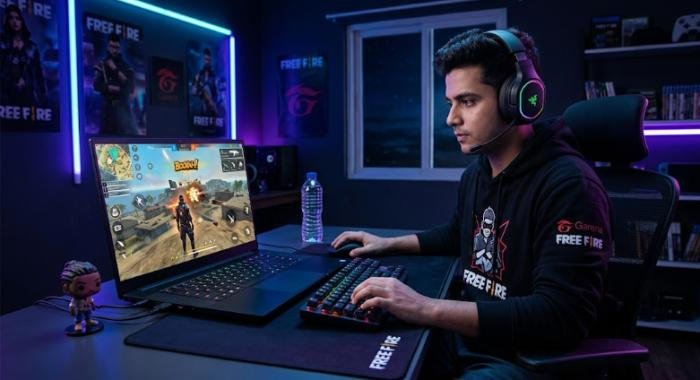
If you want a clean, unusual, or blank-looking nickname in Free Fire, you may have searched for a free fire invisible space that you can copy and paste into the game’s name field. The idea is simple: instead of entering an ordinary visible space, you use a Unicode character that normally has no visible glyph or width.
However, there is an important technical distinction. An invisible Unicode character is not the same thing as pressing the normal spacebar. Unicode defines U+200B ZERO WIDTH SPACE as a character that normally has no visible width and is used primarily to create an invisible word or line-break opportunity.
That distinction matters when creating a blank-looking Free Fire nickname. The game has its own rules for processing names, so a Unicode character that appears invisible in one application is not automatically guaranteed to be accepted or preserved by Free Fire.
This guide explains what an invisible space actually is, how the copy-and-paste method works, why it sometimes fails, what the Unicode Standard says about these characters, and what you should consider before using one as your Free Fire name.
Read More: Samsung Galaxy S26 Ultra: Expected Release Date, Price & Specs
What Is Free Fire Invisible Space?
The phrase free fire invisible space is commonly used by players to describe a character that appears blank when inserted into a nickname. In technical terms, one commonly associated character is U+200B ZERO WIDTH SPACE, abbreviated as ZWSP.
Unlike the ordinary space character, U+0020, U+200B normally has no visible glyph or intrinsic width. Unicode specifically describes it as a character used to indicate a possible word or line break without displaying an ordinary visible space.This means an invisible character can be present in a text field even though you cannot see a symbol representing it.
Is an Invisible Space Really a Space?
Not exactly.
The name ZERO WIDTH SPACE can be misleading because U+200B is technically different from the ordinary space character. Unicode lists U+0020 SPACE among its standard space characters, while U+200B is treated as an exceptional character because it has “space” in its name but does not actually have visible width in normal display.That difference is important:
- Normal space: a visible-width whitespace character.
- Zero-width space: normally invisible and has no intrinsic width.
- No character: an actually empty string containing nothing.
- Blank-looking nickname: text that contains one or more characters but appears empty to the user.
Therefore, when people search for a Free Fire invisible space, they generally mean an invisible Unicode character rather than an empty text field.
How Does Free Fire Invisible Space Work?
The concept depends on two separate systems: Unicode text and Free Fire’s nickname validation.Unicode provides characters with defined properties. The game decides which characters it accepts, stores, displays, or removes.
U+200B is designed to provide an invisible break opportunity in text. Unicode explains that it normally has no width and is intended for situations where a word-break opportunity is required without using an ordinary visible space.When such a character is inserted into a nickname field, the character can remain part of the text even though there is no obvious visual symbol.
Why Can You See Nothing After Pasting It?
An invisible character does not necessarily behave like missing text.Unicode’s guidance on unsupported characters explains that default-ignorable characters are intended to be rendered without a visible glyph or advance width when they are not explicitly supported by a rendering system. U+200B is included among these invisible characters.
So a field may contain data while visually appearing empty.This is why simply looking at the nickname field is not always enough to determine whether a character was successfully inserted.
How to Copy Free Fire Invisible Space
If you already have a verified invisible Unicode character, the basic process is similar to copying any other text.
Step 1: Select the Invisible Character: Place your cursor around the invisible character and select only the character you intend to copy.Because the character has no visible appearance, selection can be difficult. Copying additional text along with it can produce unexpected results.
Step 2: Copy It: Use your device’s normal copy function.On a phone, this generally means pressing and holding the selected text and choosing Copy. On a computer, you can use the normal copy command.
Step 3: Open Free Fire: Launch the current Free Fire application and go to the part of the account interface where your in-game nickname can be changed.The exact location and appearance of interface controls can change as the game is updated, so it is better to rely on the current in-game interface rather than an old screenshot from a tutorial.
Step 4: Paste the Character: Place the cursor in the nickname field and paste the copied character.If the field accepts it, the character may appear to occupy no visible space.
Step 5: Check the Result Before Confirming: Do not assume that every invisible character will automatically be accepted.The game may validate the character, remove it, reject the name, or process it differently. A successful paste into a phone’s notes application, browser, or messaging app does not prove that Free Fire will accept the same character.
Can You Create a Completely Blank Free Fire Name?
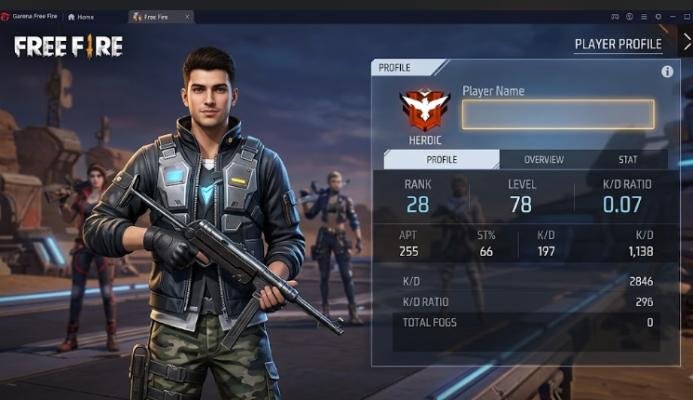
A completely empty name and a blank-looking name are two different things.An empty name contains no characters at all. A blank-looking name can contain an invisible Unicode character that produces little or no visible output.This distinction is important because a game can require a nickname to contain characters while still allowing some characters to render invisibly.
Whether a blank-looking nickname works therefore depends on Free Fire’s current nickname validation and text-processing rules.There is no reliable basis for claiming that every invisible Unicode character will work permanently or on every version of the game.
If Free Fire rejects the character, the Unicode character itself is not necessarily defective. The game may simply be filtering or processing that character according to its own rules.
Free Fire Invisible Space vs Normal Space
Understanding the difference between invisible and ordinary whitespace prevents many failed attempts.Unicode identifies numerous space characters, including the ordinary U+0020 SPACE, NO-BREAK SPACE, EN SPACE, EM SPACE, THIN SPACE, and others. U+200B is treated separately because, despite its name, it normally does not display as a visible-width space.
| Character | Unicode | Normal visual result | General purpose |
| SPACE | U+0020 | Visible spacing | Ordinary word separation |
| NO-BREAK SPACE | U+00A0 | Visible spacing | Keeps adjacent text together |
| ZERO WIDTH SPACE | U+200B | Normally invisible | Invisible break opportunity |
| WORD JOINER | U+2060 | Normally invisible | Prevents a line break |
| IDEOGRAPHIC SPACE | U+3000 | Wide visible space | Spacing in East Asian typography |
Why Does Free Fire Invisible Space Sometimes Not Work?
There are several possible reasons an invisible character may fail.
The Character Was Not Copied Correctly
Because invisible characters cannot be seen, it is easy to copy the wrong content.You may accidentally copy:
- An ordinary visible space
- Extra punctuation
- Text surrounding the character
- A different Unicode character
- Nothing at all
Free Fire May Reject the Character
A Unicode character being valid according to the Unicode Standard does not mean every application must accept it everywhere.Unicode defines what a character is and how it is generally represented. Individual applications still control how text input is validated.Therefore, Free Fire can impose its own nickname requirements.
The Game May Remove Invisible Characters
Some applications normalize or filter particular characters during input.Unicode itself notes that default-ignorable characters are normally intended to be ignored during rendering unless explicitly supported.A game can also apply its own validation before saving a nickname.
If the invisible character disappears when you paste it, that can indicate that the application has processed or removed it rather than that your copy operation necessarily failed.
The Method May Be Outdated
Free Fire changes over time, and third-party tutorials can remain online long after the behavior they describe has changed.A method that worked at one point is not automatically a current method.For this reason, avoid articles or videos that promise a permanent “100% working” invisible name without explaining when and where the method was tested.
How to Troubleshoot Free Fire Invisible Space
If your invisible nickname does not work, use a systematic approach rather than repeatedly pasting random characters.
Check 1: Test the Character Outside Free Fire
Paste the character into a basic text field.Do not expect to see a visible symbol. The purpose of this test is simply to confirm that your device can carry the copied character.
Check 2: Copy Only the Intended Character
Invisible characters are difficult to select. Make sure the clipboard does not contain additional letters, spaces, punctuation, or formatting.
Check 3: Try the Current Free Fire Name Field Again
If the game accepts the pasted character but does not save the nickname, the problem may be related to the game’s current validation rules.
Check 4: Avoid Combining Random Invisible Characters
Adding several unrelated Unicode controls does not necessarily improve compatibility.In fact, unnecessary characters can make the nickname harder to troubleshoot and may produce inconsistent results across applications.
Check 5: Check for Current Game Restrictions
If the game rejects the name consistently, do not assume there is a secret combination that must be found.The simplest explanation may be that the current version does not accept that character in the nickname field.
Does Free Fire Invisible Space Work on Android?
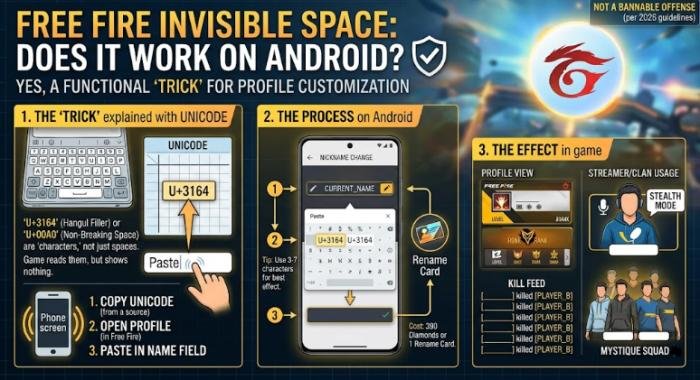
The copy-and-paste concept can be used on Android because Android devices support Unicode text. However, Android support for a character does not guarantee that Free Fire will accept it as a nickname.There are two separate questions:
- Can the device store and paste the Unicode character?
- Will Free Fire accept and preserve the character in its nickname field?
The first can be true while the second is false.
Different keyboards, Android versions, applications, and input fields can also behave differently. If a character appears invisible in one application, that does not establish that the game will process it in exactly the same way.
Does Free Fire Invisible Space Work on iPhone?
The same principle applies to iPhone and iPad devices.iOS can handle Unicode text, but the Free Fire application remains responsible for deciding what it accepts in its nickname field.
If an invisible character can be copied on iOS but is rejected after pasting into Free Fire, the issue may be game-side validation rather than a limitation of Unicode itself.
For both Android and iOS, the most reliable approach is to test the current game version instead of relying on an old compatibility claim.
Is Free Fire Invisible Space a Hack?
An invisible Unicode character is simply text data. Using a Unicode character is fundamentally different from modifying game files, running unauthorized software, or manipulating the game client.However, that does not mean every use of an invisible character is automatically permitted by a game’s rules.The important distinction is between text input and game modification.
Using a character in a nickname does not require changing the game’s files. By contrast, modified APKs, unauthorized scripts, cheats, or other software intended to alter gameplay can create separate security and policy concerns.For a nickname, the safest approach is to use normal game functionality and avoid unofficial modifications.
Is Using an Invisible Nickname Safe for Your Free Fire Account?
The character itself is not a cheat simply because it is invisible.The more important issue is the content of the nickname and whether it complies with Garena’s rules.
Garena’s current Abuse Policy specifically covers inappropriate in-game names and signatures. It prohibits names involving categories such as hate speech, discrimination, violence, offensive or obscene content, impersonation of Garena staff or other players, illegal activities, and harassment.
Garena also states that an inappropriate in-game name can be reset to a default name without prior notice. Serious or repeated violations can result in account suspension or termination.
An Invisible Name Does Not Bypass the Rules
Making a nickname visually blank does not make the account exempt from Free Fire’s policies.A player should not use invisible characters to disguise offensive content, impersonate another player, evade moderation, or create a name that violates the game’s rules.The safest use is simply a harmless nickname style.
Can Invisible Characters Cause Display Problems?
They can behave differently from ordinary letters and numbers because their purpose is different.Unicode describes default-ignorable characters as characters that generally have no visible glyph or advance width by themselves, although some can influence the display or positioning of nearby characters.
That means an invisible character may look the same to you while being processed differently by different systems.For example, one application may preserve it, another may remove it, and another may treat it as an input that has no visible effect.This is one reason it is better to describe an invisible nickname as blank-looking rather than claiming it is literally empty.
Free Fire Invisible Space and Unicode Characters
Unicode is the international standard that assigns code points and properties to characters used in digital text.U+200B is particularly relevant to invisible-space discussions because Unicode defines it as ZERO WIDTH SPACE. Its primary purpose is not gaming; it was designed to provide invisible word or line-break opportunities in writing systems where ordinary visible spaces are not used in the same way.
This is an important point for accurate SEO content: calling U+200B a “Free Fire character” would be misleading.It is a Unicode character that some users may attempt to use in Free Fire’s nickname field.That wording is more technically accurate and avoids suggesting that Garena created or officially recommends the character.
Common Mistakes When Using Free Fire Invisible Space
Mistake 1: Confusing a Normal Space With an Invisible Character
Pressing the spacebar does not produce U+200B. The standard keyboard space is U+0020.
Mistake 2: Assuming Every Invisible Character Is Identical
U+200B ZERO WIDTH SPACE, U+2060 WORD JOINER, and other invisible/default-ignorable characters have different Unicode properties and purposes.
Mistake 3: Trusting “100% Working” Claims
Game behavior can change. A third-party character generator cannot guarantee that Free Fire will accept a particular character indefinitely.
Mistake 4: Installing Unknown Software
You do not need to install an unofficial modified game client merely to experiment with text input.Avoid downloading unknown APKs, scripts, or tools that claim to create a special Free Fire name by modifying the game.
Mistake 5: Ignoring Garena’s Name Rules
A blank-looking name is still an in-game name. Garena’s policy applies to in-game names regardless of whether the characters are visually obvious.
Best Practices for a Blank-Looking Free Fire Name
If you want to try an invisible nickname, keep the process simple.First, use a known Unicode character rather than randomly combining multiple formatting characters. Second, copy only the character you actually need. Third, test it in the current Free Fire nickname field. Finally, make sure the resulting name does not violate Garena’s rules.
It is also sensible to keep an alternative visible nickname ready.If the invisible character is rejected after a future game update, you can switch to a conventional nickname rather than repeatedly trying unsupported combinations.
Free Fire Invisible Space: What You Should Know in 2026
The most important fact is that free fire invisible space is a search term describing a practical nickname technique, not an official Free Fire feature name.The technical foundation comes from Unicode. U+200B ZERO WIDTH SPACE is a real Unicode character that normally has no visible width and is intended primarily for invisible word or line-break opportunities.
Free Fire, however, controls its own nickname input and validation.Therefore, there are three separate layers to consider:
- Unicode: defines the character and its properties.
- Your device: handles copying, storing, and pasting the character.
- Free Fire: determines whether that character is accepted and preserved in the nickname.
Keeping these three layers separate makes the topic much easier to understand and prevents unrealistic claims about compatibility.
Final Verdict
A free fire invisible space is best understood as a Unicode-based nickname technique rather than a special Free Fire feature. The commonly discussed U+200B ZERO WIDTH SPACE is a legitimate Unicode character that normally has no visible width and was designed for text-processing purposes, particularly invisible word or line-break opportunities.The practical copy-and-paste method is straightforward, but its success depends on Free Fire’s current nickname validation. A character that is technically valid Unicode is not automatically guaranteed to be accepted by a particular game.
For the best results, copy the character carefully, avoid mixing unrelated invisible characters, test the current game version, and keep a normal nickname available as an alternative. Most importantly, remember that a blank-looking name still has to follow Garena’s rules for in-game names.In short, Unicode determines what the invisible character is; your device determines how it is copied and handled; and Free Fire determines whether it can actually be used as a nickname. That is the most accurate way to approach invisible-name methods in 2026.
Frequently Asked Questions About Free Fire Invisible Space
Q1. What is free fire invisible space?
Ans: Free Fire invisible space is a common term for an invisible Unicode character that players may try to use in a Free Fire nickname. One commonly associated character is U+200B ZERO WIDTH SPACE, which Unicode defines as a character with no intrinsic width and no normal visible glyph.
Q2. Is free fire invisible space the same as a normal space?
Ans: No. A normal space is U+0020 SPACE, while U+200B ZERO WIDTH SPACE is a different Unicode character. U+200B normally has no visible width and serves a different technical purpose.
Q3. Can I use free fire invisible space to create a blank nickname?
Ans: It can create a blank-looking nickname if the current Free Fire nickname system accepts and preserves the character. It is not guaranteed to work on every version, device, or account because the game controls nickname validation.
Q4. Why is my free fire invisible space not working?
Ans: The character may not have been copied correctly, the game may reject it, or the current nickname system may remove or process it differently. An invisible Unicode character working in another text application does not guarantee acceptance by Free Fire.
Q5. Does free fire invisible space work on Android?
Ans: Android can handle Unicode text, but device-level Unicode support does not guarantee Free Fire compatibility. The current version of the game ultimately determines whether the character can be used in the nickname field.
Q6. Does free fire invisible space work on iPhone?
Ans: The same principle applies to iPhone. iOS can handle Unicode text, but Free Fire decides which characters it accepts in its nickname field. If the character is rejected, changing the device alone may not solve the problem.
Q7. Is U+200B actually invisible?
Ans: Normally, yes. Unicode describes U+200B ZERO WIDTH SPACE as having no intrinsic width, and its normal display does not produce a visible space. Unicode also identifies it among default-ignorable characters.
Q8. Is free fire invisible space an official Garena feature?
Ans: There is no basis in the official Garena material cited here for calling it an official Free Fire feature. U+200B is a Unicode character with a general text-processing purpose; whether Free Fire accepts it is a separate application-level question.
Q9. Can an invisible Free Fire name violate the game’s rules?
Ans: Yes. Making a nickname invisible does not remove it from Garena’s in-game name policy. Garena states that inappropriate names can be reset and that serious or repeated violations can lead to account suspension or termination.
Q10. Is using an invisible Unicode character the same as hacking Free Fire?
Ans: No. A Unicode character is text data, not a game modification. However, users should still follow Free Fire’s rules and avoid unauthorized software, modified clients, or other tools designed to manipulate the game.